
The Only AI Studio
You'll Ever Need.
Script. Voice. Music. Video. Done.
Generate professional video in minutes
Introduction
MediaMaker: the All-in-One AI Studio
Manage every stage of AI video production — all in one browser tab
Script
AI-powered writing for compelling narratives.
Visuals, Characters & Video
Multi-modal generation of visuals, digital actors, and video content.
Voice, Music & Sound Effects
Synchronized audio elements to enhance your video.
Editing
Embedded AI editing capabilities or export to your preferred editing suites.
Powered by the world's leading AI models



All logos and trademarks are the property of their respective owners.
Trusted Worldwide
Built by Creators, for Creators.
"MediaMaker was built from the CreatorUp studio — not a tech lab — to give individuals and teams the power to build scalable, professional video in a single secure environment."
— Mike Tringe, CEO, CreatorUp
CreatorUp is trusted by over 350 global brands, including:






Why We Built MediaMaker
Create more. Create faster. Create without limits.
More output, less effort — at any scale.
Speed & Ease
- Create Faster: 10× production speed with parallel AI processing — no waiting, no bottlenecks.
- Create Easier: One unified studio replaces a dozen disconnected tools. Go from prompt to polished video in minutes.
Scale & Security
- Create at Scale: Leverage custom templates, bulk generation, team collaboration, and shared asset libraries.
- Secure by Design: Your proprietary data stays safe inside a controlled, secure environment. Your data is never used to train AI models.
Customization & Possibility
- Full Customization: Control every asset — visuals, audio, layout, timing — exactly the way you want it.
- Unlimited Possibilities: Adapt formats for any platform and export directly to professional editing tools.
The New Standard
Everything you need to create at scale
AI-powered generation and editing — one platform, zero compromises.
AI-Powered Video Creation
Paste a URL, upload a script, type a sentence, or pick a template — MediaMaker generates a full multi-scene video in seconds. AI memory carries context across sessions for smarter results.
- 4 creation modes: text, URL, script & file upload
- Template wizard with dynamic inputs & guided steps
- Bulk image, video & voiceover generation in one click
Built-in Media Toolkit
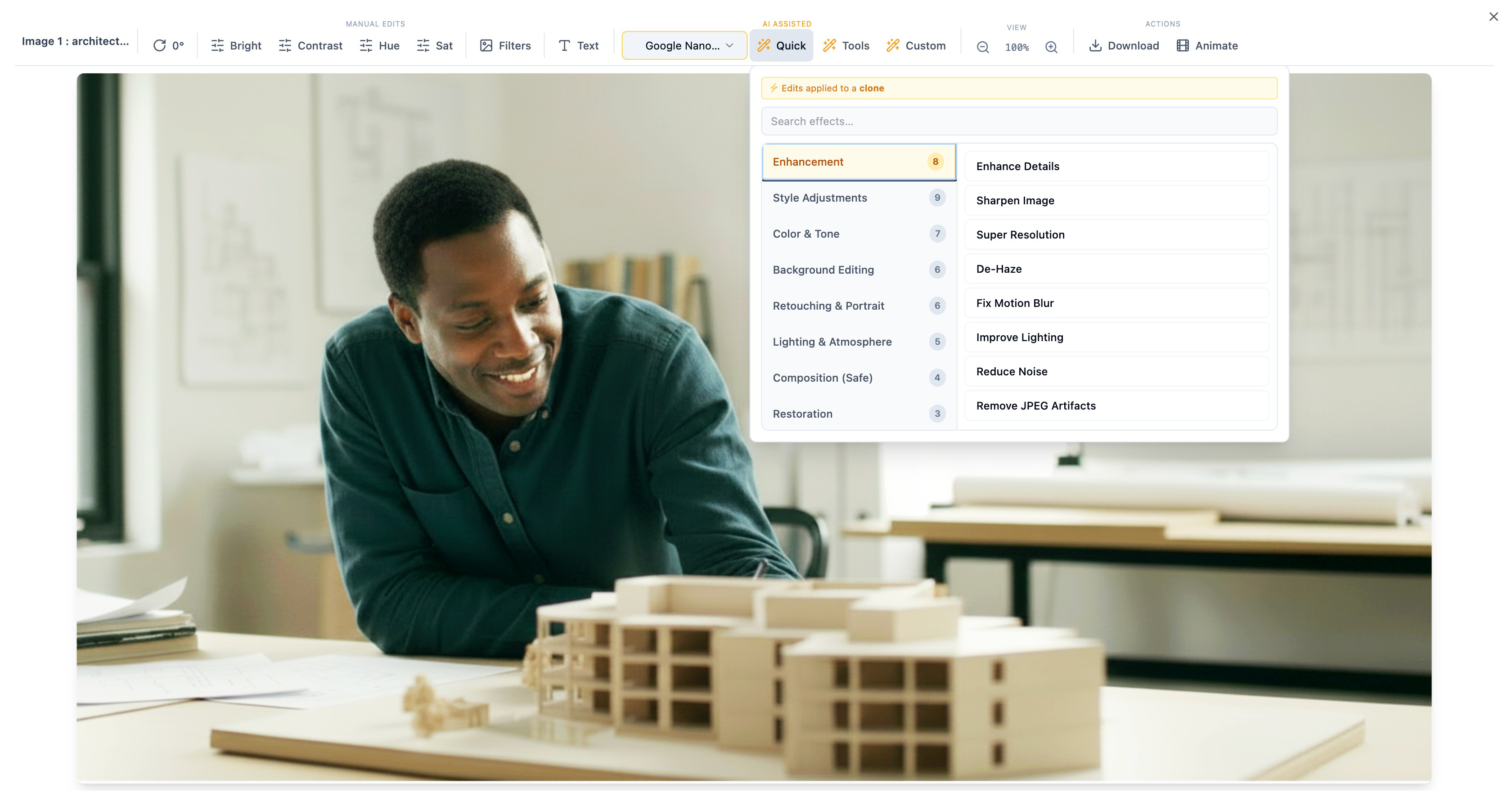
Trim, resize, adjust speed, transcode formats, normalize audio — all inside the browser. Plus deep AI image editing powered by Google Nano for one-click enhancements.
- Video trim, resize & speed control
- Audio normalization & format conversion
- AI image editing: de-haze, sharpen, style transfer & upscale
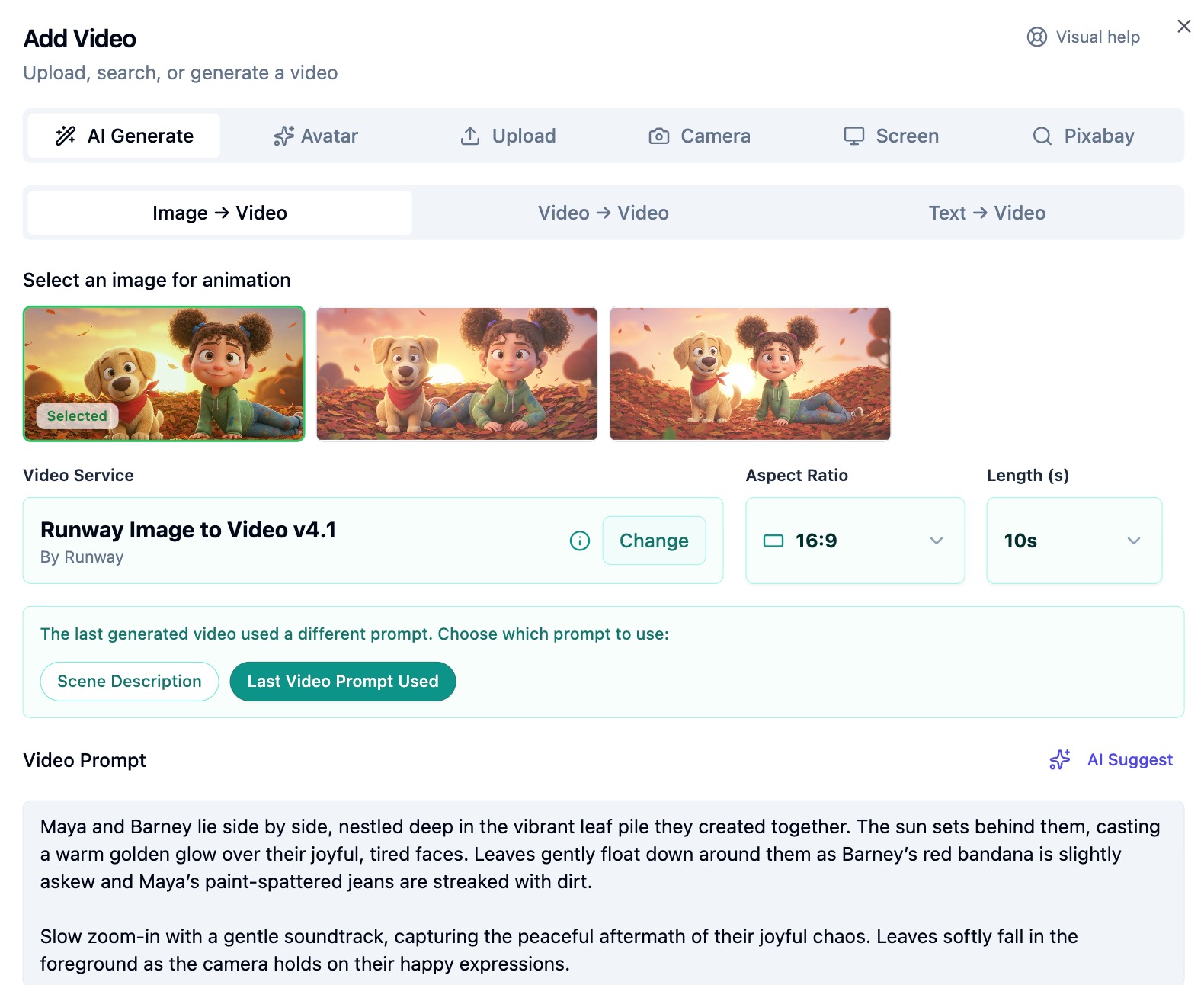
Precision Audio & Visual Control
Choose from 6 scene layout modes, set per-scene durations and aspect ratios, generate AI voiceovers, create AI music, add avatar presenters, and fine-tune the audio mix before rendering.
- 6 layout modes: Grid, Vertical, Immersive, Filmstrip & more
- AI voiceover, avatar videos & music generation
- Per-scene audio FX with volume mixing controls
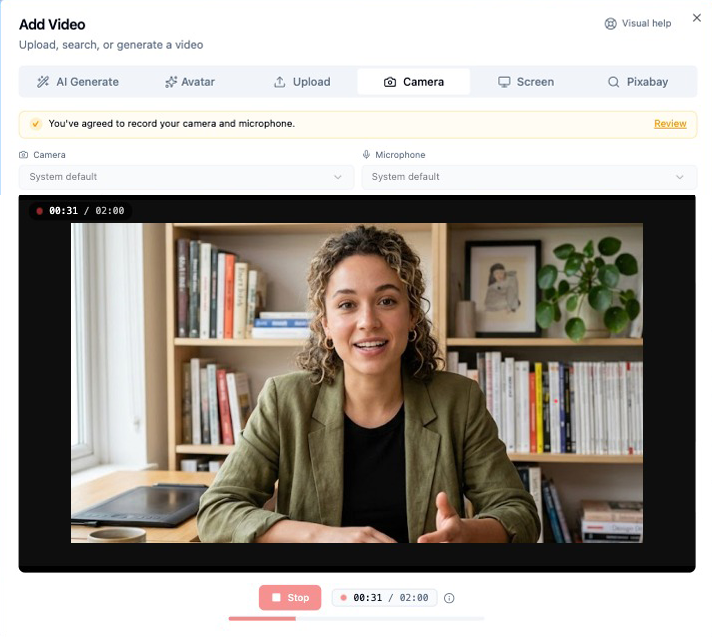
Record Directly in MediaMaker
Capture your screen, camera, or microphone without ever leaving the studio. Recordings save instantly into the scene you are working on — no uploads, no switching apps, no extra tools required.
- Screen, camera & microphone recording in one place
- Local processing for fast, private, secure handling
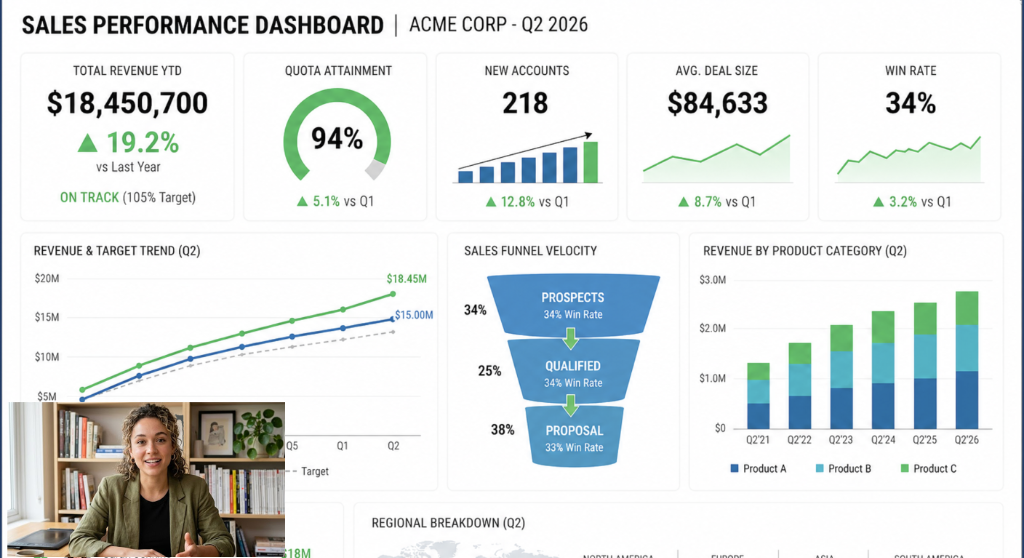
Picture-in-Picture Compositing
Layer any secondary visual over your primary content to create dynamic, multi-layered storytelling. PiP supports every media combination — image-on-image, image-on-video, video-on-image, and video-on-video — with full composition control per layer.
- Any media combination: image or video on image or video
- Per-PiP control over placement, size, opacity & duration
- Perfect for tutorials, reaction videos & multi-layer presentations
Public Links & Timestamped Comments
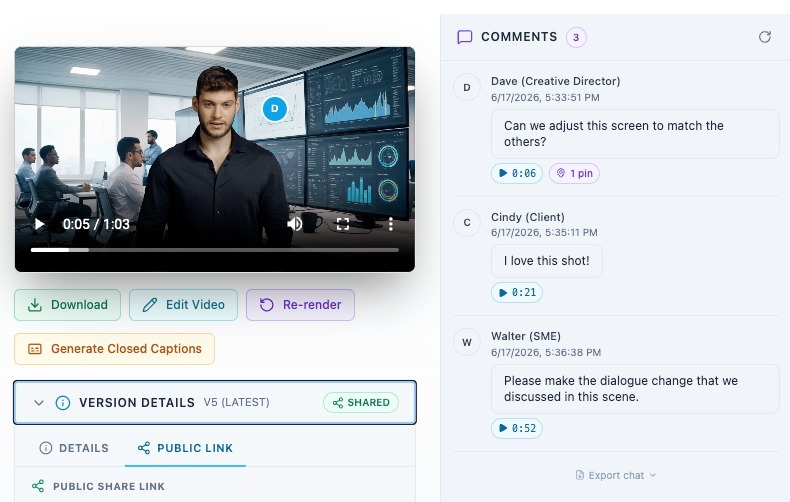
Share a hosted review link with clients or stakeholders and collect frame-accurate feedback directly on your rendered video — no account required for viewers. Clicking any timestamp jumps the player to that exact moment, turning MediaMaker into a collaborative post-production environment.
- Share a public link to any rendered video in one click
- Viewers comment at exact timestamps — click to jump to that moment
- Real-time feedback loop like Frame.io, built right into MediaMaker
And so much more
Cloud Rendering
One-click render in the cloud. No local hardware needed.
Editor Export
Export to Premiere Pro, Final Cut Pro, DaVinci Resolve & EDL.
Closed Captions
Auto-generate subtitles at render time and download as a standard .srt file.
Render Versioning
Name each render version, add notes, language and details. Browse, compare & restore any snapshot.
AI Avatars
Generate presenter videos with AI actors, voices & backgrounds.
Pixabay Library
Search millions of royalty-free stock images and videos.
AI Music
Generate background tracks from a description with style & tempo.
Team Collaboration
Invite by email with read, edit & delete permissions.
Aspect Ratios
16:9, 9:16, 1:1 — optimized for every platform.
Template Wizard
Multi-step guided wizard with dynamic inputs & live preview.
Bulk Generation
Generate images, videos, voiceovers & effects for all scenes at once.
Usage Analytics
Visual dashboards, credit calculator & CSV export.
Smart Folders
Organize projects into folders with search & quick filters.
In-App Recording
Capture your screen, camera, or mic directly in MediaMaker. Zero credits, saves instantly into your scene.
Picture-in-Picture
Layer any image or video over primary content. Control placement, size, opacity & duration per PiP box.
Visual Help Tours
Interactive walkthroughs guide you through every screen — get up to speed in minutes.
Public Review Links
Share a hosted video link and collect timestamped comments from clients — no account needed.
Inside the AI Studio
From spark to screen in record time.
Everything you need, exactly where you need it.
Input
Text prompt, URL, script, file upload, or template
AI Generation
Project structure, scenes & dialogue created by AI
Media
AI images, video, voiceover, audio FX & avatars
Editing
Trim, resize, speed, AI image editing & toolkit
Music & Mix
AI music, audio mix, transitions & subtitles
Render & Export
Cloud render, versioning & NLE export
The Complete Toolkit
Every Feature, in detail.
Discover the full power of MediaMaker, mapped directly to your creative flow.
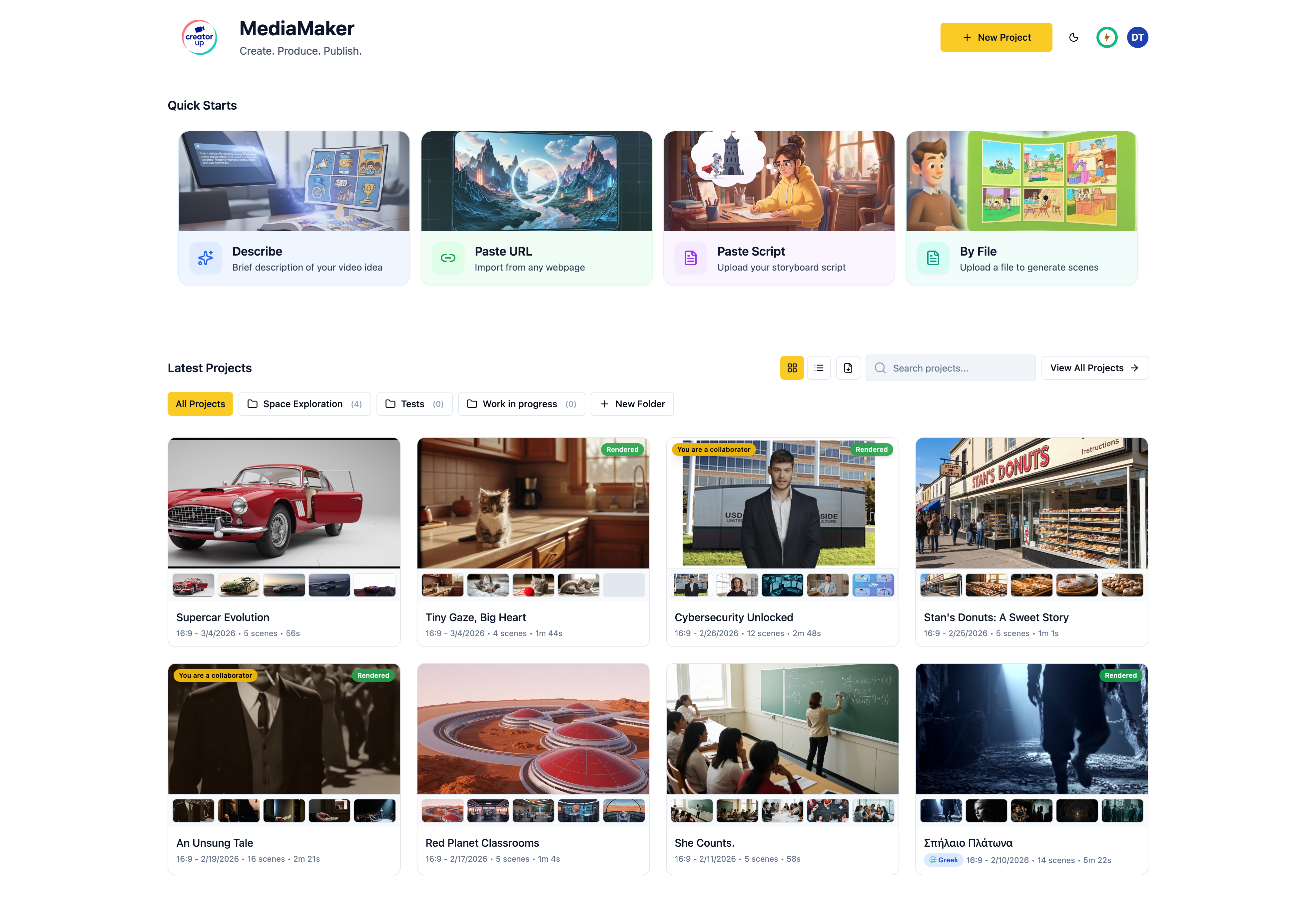
Visual Project Grid
Card-based listing of all your projects with thumbnails and metadata
Smart Folders
Create, rename, and delete folders — move projects between them instantly
Search & Filter
Filter projects by folder and search across all your content
Quick Starts
4 creation modes — Describe, Script, URL, or File Upload
Template Picker
Browse templates with square thumbnails and one-click project creation
CSV Export
Export project data as CSV from the dashboard for external use
Pagination
Paged project listing for fast navigation across large libraries
Recent Projects
Quick-access list of your most recently accessed projects
Interactive Help Tours
Visual walkthroughs guide you through the dashboard, project details, scene editor, and element screens — accessible from the top or bottom of each page
6 Layout Modes
Grid Cards, Vertical Cards, Immersive, Filmstrip, Horizontal Filmstrip, and List views
Scene Management
Add scenes at specific positions, edit, duplicate, and delete with confirmation
AI Scene Creation
Generate entirely new scenes from a text prompt
Drag-and-Drop Reorder
Native HTML5 drag-and-drop for scene reordering with visual feedback
Multi-Select & Bulk Delete
Select multiple scenes for bulk operations including batch deletion
Scene Search & Filter
Client-side filtering to quickly find specific scenes
Scene Swap
Instantly swap the positions of any two scenes
Rich Scene Fields
Title, Description, Visual Description, Dialogue, Action Notes, Keywords, Director Notes, Audio Effects
Inline Header Editing
Edit title, description, aspect ratio, and folder assignment in-place
Persistent Settings
Characters, Set, Style, and Instructions that persist across all scenes
Picture-in-Picture (PiP)
Layer any secondary image or video over your scene’s primary content — supports image-on-image, image-on-video, video-on-image, and video-on-video combinations
PiP Composition Controls
Adjust placement, size, opacity, and duration independently for each PiP layer within a scene
PiP Use Cases
Ideal for tutorials, reaction videos, presenter overlays, and multi-layered professional presentations
From Description
Generate a full project from a text description of your idea
From URL
Generate a project from any web page URL automatically
From Script
Generate a project from a written script or screenplay
From Template
Use pre-built templates with a guided wizard and dynamic inputs
File Attachments
Attach reference files during any AI creation mode for context
AI Memory
Opt-in contextual memory that carries across generation calls
AI Image Generation
Multiple AI services with configurable aspect ratio and optional attachments
AI Video Generation
Text-to-video and image-to-video AI services per scene
AI Voiceover (TTS)
Multiple TTS services with voice selection, stability, similarity & style controls
AI Audio Effects
Generate ambient sounds and effects from text descriptions
Bulk Image Generation
Generate images for all or selected scenes in one batch
Bulk Video Generation
Generate videos for all or selected scenes in one batch
Bulk Voiceover Generation
Generate voiceovers for all or selected scenes in one batch
Bulk Audio FX Generation
Generate audio effects for all or selected scenes at once
Per-Scene Media Library
Each scene has its own images, videos, voiceovers, and audio effects
Default Media Selection
Set a specific media item as the "default" for rendering
Image & Video Upload
File upload with real-time progress tracking
Voiceover & Audio Upload
Upload custom audio files and sound effects per scene
Pixabay Image Search
Search and import millions of royalty-free stock images
Pixabay Video Search
Search and import royalty-free stock video clips
Import from URL
Import images and videos from external URLs directly
Media Preview Modal
Full preview of any media item with metadata display
Screen Recording
Record your screen directly in MediaMaker and save the clip instantly into the current scene — no external tools needed
Camera Recording
Record from your webcam to create custom presenter or reaction clips that drop straight into your scene
Microphone Recording
Capture a custom voiceover with your microphone — saved as a scene audio clip with zero credit cost and local processing
Video Trimming
Cut video start and end points non-destructively
Resize & Crop
Change video and image dimensions with aspect ratio lock option
Speed Control
Adjust playback speed for video and audio independently
Transcoding
Convert between video and audio formats and bitrates
Audio Normalization
Loudness normalization to target LUFS for consistent audio
Extract Audio
Pull audio tracks from any video file
Image Editing
Resize, convert formats, and adjust quality controls for images
AI Image Editing
De-haze, sharpen, style transfer, super resolution via Google Nano
Undo & Preview
Step-by-step undo through operations and preview before committing
Save Options
Save as a new asset or overwrite the original — fully non-destructive
AI Avatar Video
Generate presenter videos with AI actors, voices, and backgrounds
Actor Library
Browse and select from a library of available AI actors
Voice Library
Browse voices filtered by service, language, or favorites
Background Library
Browse and select backgrounds filtered by service or favorites
Favorite Actors, Voices & BGs
Mark items as favorites for quick access across projects
AI Music Generation
Generate background music from text with style, instruments & duration
Multiple Music Services
Choose from available AI music providers
Music Library & Upload
List all generated and uploaded tracks, upload custom music
Default Track Selection
Set a specific track as the default for rendering
Cloud Rendering
Industry-grade video compositing via Shotstack — no local hardware
Render Configuration
Configure transitions, filters, animations, resolution, and aspect ratio
Audio Mix Control
Toggle and adjust volume for music, voiceover, audio effects & original audio
Real-Time Render Tracking
Live status updates for rendering jobs with progress indicators
Named Render Versions
Give each rendered video a custom name to distinguish cuts, languages, or revision rounds
Version Details & Notes
Attach notes, language tags, and contextual details to any render version for full production traceability
Automatic Version History
Every render is saved as a versioned snapshot (v1, v2, …)
Version Browser
Compare historical renders side-by-side, download or delete any version
Closed Captions (.srt)
Auto-generate subtitles for any video at render time and download as a standard .srt file for professional distribution and accessibility
Adobe Premiere Export
Export project timelines compatible with Adobe Premiere Pro
Final Cut Pro X Export
Export project timelines compatible with FCPX
DaVinci Resolve / EDL
Timeline export for professional video editors
PDF, JSON, XML, PNG Export
Export project data in multiple document formats and scene maps
Media ZIP Export
Download all images, videos, voiceovers, or audio as ZIP packages
Invite by Email
Add collaborators to any project via email invitation
Granular Permissions
Assign read, edit, and delete permissions independently
Update Permissions
Modify collaborator permissions at any time after invitation
Remove Collaborators
Remove team members by ID or email from a project
Leave Project
Users can remove themselves from a shared project
Public Review Links
Generate a shareable hosted link to any rendered video — no account required for external viewers
Timestamped Comments
External reviewers leave feedback pinned to exact moments in the video; click any timestamp to jump the player to that point
Rendered Video Modal
The full review and commenting interface is housed within the Rendered Video Modal, keeping feedback in context with the video
Template Wizard
Multi-step guided wizard with dynamic inputs, validation & review
Usage Analytics
Visual dashboard with charts, credit calculator & CSV export
Dark & Light Theme
Switch between dark and light modes with glassmorphism design
Responsive Design
Mobile-aware layouts that adapt to any screen size
NEW MediaMaker Templates
Scale your brand with instant, consistent video formats.
Stop starting from scratch. Select a template, and MediaMaker — powered by AI Memory — automatically carries your style, characters, and tone across every scene you generate.
Ready-to-Use Library
Browse our built-in collection of professional templates designed for the most common video formats — instantly accessible to kickstart any project.
Custom Enterprise Templates
Work with the CreatorUp professional services team to build templates specific to your organization's video needs — so every creator starts from the same playbook.
AI Memory Keeps You on Track
MediaMaker's AI Memory carries your style, characters, tone, and creative direction across every scene and session — so your output stays consistent without repeating yourself.
A Platform for the Planet
Built for a Global Audience. Speak to the World.
Reach every audience, in every language, from a single project.
Prompt in Any Language
Our built-in translation engine converts your text and communicates with MediaMaker natively. Work in the language you think in — no extra steps required.
Localize Your Final Output
Once your video is complete, instantly translate and lip-sync your final output into over 100 languages. Reach every market, effortlessly.
Use Cases Without Borders
Designed for Global Teams Across Every Industry.
One platform, purpose-built for the creators, communicators, educators, and marketers who move the world forward.
Marketing & Agencies
Generate professional storyboards and videos in minutes. AI Memory carries your creative direction — style, tone, and characters — across every project without starting over.
Social Media & eCommerce
Scale video creation for content supply chains — from social campaigns to product catalogs.
Multinational Marketing
Ship global launches in days. Version content by audience, channel, language, and culture.
Global Sales & Customer Success
Personalized onboarding video in every customer's native language. Show, don't just tell.
Product Development
Create product explainers and how-to videos to showcase your latest products and services.
Internal Comms, PR, IR & HR
Updates employees actually watch. High-fidelity visuals and voices for global stakeholders.
Education & Training
Turn PDFs and outdated lessons into videos people finish. Pre-K to grey.
Social Impact
Amplify your stories with Hollywood-grade media. Communicate your hopes, values, and ideas at scale.
Customer Stories
See What Our Creators Are Building.
Real results from real teams across marketing, L&D, communications, and creative production.
"CreatorUp's MediaMaker allows internal communications to rapidly create videos that build transparency and facilitate alignment across the entire organization.
"MediaMaker helps marketing and advertising teams go from idea to video in minutes, not weeks.
"CreatorUp's MediaMaker makes educational videos that transform the learner journey from flat and boring to dynamic and engaging.
"Generating a multi-scene AI storyboard with synchronized audio and immediately exporting the EDL to Premiere Pro is a game-changer for our post-production workflow.
Comparison
Why Professionals Switch to MediaMaker
MediaMaker offers a comprehensive suite of AI video creation tools, outperforming basic AI apps in flexibility, speed, and control.
| Feature | Basic AI Content Tools | MediaMaker: The Complete AI Studio |
|---|---|---|
| Model Access | Locked to 1–2 models | Constantly updated with many of the leading AI engines |
| Input Flexibility | Text-to-Video only | TXT, PDF, JPG, Audio, Video & URL |
| Production Speed | Sequential (scene by scene) | Parallel (10× faster) |
| Creative Direction | Loses context between sessions | AI Memory carries style, tone & characters across every project |
| Global Ready | Manual or limited translation | Translation: 100+ languages |
| Industry Pipeline | In-app export only | Edit in-app or export to Premiere, FCPX, DaVinci |
| Content Capture | Requires external recording software (Loom, OBS, QuickTime) | Built-in screen, camera & mic recording — zero credits, local processing, saves directly into your scene |
| Multi-Layer Compositing | Single media layer per scene | Picture-in-Picture — layer any image or video over primary content with full placement, size, opacity & duration control |
The Human Advantage
Creative Professionals Standing By.
Beyond the platform, you gain access to CreatorUp's global network of creative professionals.
Consult & Configure
Need help integrating AI into your existing workflow? Our experts are available on-demand for strategic consulting, accelerated onboarding, and hands-on training.
- Custom AI Memory setup — style, tone & creative direction
- Template configuration for your team
- Strategic workflow consulting
Done-For-You Production
Lacking internal bandwidth? Let us do it for you. Our global creative workforce acts as an extension of your team — delivering fully finished assets directly to your inbox.
- Fully produced, on-brand video content
- Powered by MediaMaker at scale
- Delivered by vetted creative professionals
Pricing
Plans for Every Creator
Choose the plan that fits your needs.
Your First AI Video Is Minutes Away.
Draft, generate, and edit without ever leaving your browser tab.
Request a Demo for Your Organization
Speed. Scale. Limitless Creative Possibilities.
Get the ultimate all-in-one AI studio for your team.
Ready to Scale?
- Whether you're a team of 10 or 10,000, you deserve more than a generate button.
- Replace fragmented apps with the industry's most advanced AI Studio — available now, in your browser.
- Join the world's leading organizations using secure, enterprise-grade AI to unleash your team's creative potential.
- Access creative pros standing by to help — globally.
Request a Demo for Your Team
Get a custom walkthrough tailored to your creative needs.
Frequently Asked Questions
Everything you need to know about MediaMaker
MediaMaker is an all-in-one AI video studio that combines leading AI models — from Google, OpenAI, Runway, and ElevenLabs — to create professional storyboards, voiceovers, music, and videos in one unified workflow.
By bringing together scriptwriting, visual generation, voiceover, sound effects, and music into a single interface that handles everything for you. Go from prompt to polished video in minutes.
Marketing ads, product demos, training modules, sales outreach videos, and internal comms — all from a single prompt or file upload. Supports text, PDF, JPG, audio, video, and URL inputs.
MediaMaker aggregates the world's best AI engines — Google, OpenAI, Runway, ElevenLabs — to ensure the best tool for every job, every frame, every voice. Most competitors lock you into one or two models.
A global creative studio trusted by 350+ brands like Google and IBM, with 10+ years in high-quality digital media production. MediaMaker was built from the CreatorUp studio — not a tech lab.
No single AI is perfect. Orchestrating multiple models ensures the best tool for every frame, voice, and visual moment — giving you consistently superior results.
AI Memory stores your preferred style, tone, characters, and creative direction — and carries them across every scene and session. So you spend less time repeating yourself and more time creating.
10× faster than traditional tools, thanks to parallel rendering of all assets simultaneously.
Yes. 100+ languages are supported with Automatic Prompt Translation for high-fidelity non-English projects, plus lip-synced localization for your final output.
Yes. MediaMaker provides a secure, controlled environment with enterprise-grade security, keeping your proprietary data protected at every layer. Your data is never used to train AI models.
All plans support cross-organization collaboration, shared libraries, and granular permission management by role — read, edit, and delete access per project.
Go to creatorup.com/mediamaker to sign up and create your first AI video in minutes. Annual plans save up to 22%.
Yes. Upload any PDF or TXT file and MediaMaker automatically extracts the content to build a complete multi-scene video project — no manual scripting required.
Yes. Export your project timeline directly to Adobe Premiere Pro, Final Cut Pro, or DaVinci Resolve for professional post-production editing.
MediaMaker brings together 30+ AI models including Google Veo, Imagen, and Gemini; OpenAI GPT-4o; Runway Gen-4; ElevenLabs voice and music; and LumaLabs Dream Machine.
Unlike single-model tools, MediaMaker combines 30+ leading AI engines in parallel — giving you the best results for every frame, voice, and visual. Plus AI Memory for consistent creative direction, 100+ language support, and direct professional editor export.